| Page 2 of 2 |
NForce2007
Banned
Posts: 300
Location: playstation home.
|
|
| Back to top |
|
 |
|
|
 Posted: Sat, 21st Mar 2009 05:01 Post subject: |
|
|
My shoes. I have access to cheap cooling hardware via a friend and anytime a new heatsink comes along I jump on the opportunity to install in hopes of better temps.
|
|
| Back to top |
|
|
NForce2007
Banned
Posts: 300
Location: playstation home.
|
|
| Back to top |
|
|
|
|
| Posted: Sat, 21st Mar 2009 12:53 Post subject: |
|
|
@Krazy
Because I'm pretty much broke at the moment mate, and I spent a shitload on this cooler .. I'd rather not, if I can help it, give up just yet. Idle temps are now pretty stable at 41c, which is around 3-4c lower than my old stock cooler --- and full load are stable at around 55c, a drop of around 5-10c from stock.
STILL not overly impressed, but I'm going to try the fan trick today and if the heatsink doesn't get warmer (still ice cold right now) I'll get some grit paper and start lapping next week.
Something is definitely wrong due to the temperature of the heatsink. It's just not drawing heat adequately enough away from the CPU ... and that goes contrary to every bench and review I've seen of this cooler :-\
|
|
| Back to top |
|
|
NForce2007
Banned
Posts: 300
Location: playstation home.
|
|
| Back to top |
|
|
|
|
| Posted: Sat, 21st Mar 2009 14:05 Post subject: |
|
|
It's not acceptable, mate. Not when it cost me £60 ($80? 90?) and every review shows even the 65nm processors not getting anywhere NEAR 55c at full load. I expected more .. though, to be honest, knowing about the TJmax has given me a bit less worry about clocking the chip even higher and hitting 70c at load.
I guess I just expected more.
|
|
| Back to top |
|
|
|
|
|
| Back to top |
|
|
|
|
|
| Back to top |
|
|
|
|
| Posted: Sat, 21st Mar 2009 22:52 Post subject: |
|
|
| KrAzY-KaMeL wrote: | The coolers ability to dissipate heat really comes into play during load. I wouldn't worry too much about IDLE temps although yours are a bit high for a chip like that. Just make sure that Intels Speedstep is enabled so that at least it drops the vcore/speed/bus speed while you're just browsing the net, etc.
Do you know what the TDP on your CPU is? That heatsink probably has some horrible welds or some defect that occured during machining. Or your ambient temps are that of the Sun. 
And damn, that thing was $80!?
Yeah if money's tight I'd just hold onto it for a bit until you can afford something else. I'm sure even the $20 Arctic Freezers, etc - would do a better job at this point. |
Aye, it's idling at 44c right now and still tops out at 55c under load (after my earlier conversation, I'm no longer worrying about 70c+ load either .. so now it's just a matter of principle rather than necessity.
According to official specs, the TDP of the E7200 is 65w - and my ambient case temps are 24c. I know most high-end coolers are usually Ambient+20, so perhaps I'm really just worrying over nothing?
Yeah, this thing was expensive! I didn't think anything of it at first, mainly because of all the glowing praise and reviews. Now I'm starting to slightly regret my decision, lol. Anyway, I'll be lapping the base of the sink AND the IHS on the CPU this week, see if that doesn't start drawing the heat from the chip.
|
|
| Back to top |
|
|
|
|
| Posted: Sun, 22nd Mar 2009 09:17 Post subject: |
|
|
| sabin1981 wrote: | | KrAzY-KaMeL wrote: | The coolers ability to dissipate heat really comes into play during load. I wouldn't worry too much about IDLE temps although yours are a bit high for a chip like that. Just make sure that Intels Speedstep is enabled so that at least it drops the vcore/speed/bus speed while you're just browsing the net, etc.
Do you know what the TDP on your CPU is? That heatsink probably has some horrible welds or some defect that occured during machining. Or your ambient temps are that of the Sun.
And damn, that thing was $80!?
Yeah if money's tight I'd just hold onto it for a bit until you can afford something else. I'm sure even the $20 Arctic Freezers, etc - would do a better job at this point. |
Aye, it's idling at 44c right now and still tops out at 55c under load (after my earlier conversation, I'm no longer worrying about 70c+ load either .. so now it's just a matter of principle rather than necessity.
According to official specs, the TDP of the E7200 is 65w - and my ambient case temps are 24c. I know most high-end coolers are usually Ambient+20, so perhaps I'm really just worrying over nothing?
Yeah, this thing was expensive! I didn't think anything of it at first, mainly because of all the glowing praise and reviews. Now I'm starting to slightly regret my decision, lol. Anyway, I'll be lapping the base of the sink AND the IHS on the CPU this week, see if that doesn't start drawing the heat from the chip. |
I've never even heard of the company who makes that shit, personally, zalman knows what their doing and what's expected of their products, I'll never stray. |
|
| Back to top |
|
|
NForce2007
Banned
Posts: 300
Location: playstation home.
|
| Posted: Sun, 22nd Mar 2009 11:04 Post subject: |
|
|
| SpykeZ wrote: | | sabin1981 wrote: | | KrAzY-KaMeL wrote: | The coolers ability to dissipate heat really comes into play during load. I wouldn't worry too much about IDLE temps although yours are a bit high for a chip like that. Just make sure that Intels Speedstep is enabled so that at least it drops the vcore/speed/bus speed while you're just browsing the net, etc.
Do you know what the TDP on your CPU is? That heatsink probably has some horrible welds or some defect that occured during machining. Or your ambient temps are that of the Sun.
And damn, that thing was $80!?
Yeah if money's tight I'd just hold onto it for a bit until you can afford something else. I'm sure even the $20 Arctic Freezers, etc - would do a better job at this point. |
Aye, it's idling at 44c right now and still tops out at 55c under load (after my earlier conversation, I'm no longer worrying about 70c+ load either .. so now it's just a matter of principle rather than necessity.
According to official specs, the TDP of the E7200 is 65w - and my ambient case temps are 24c. I know most high-end coolers are usually Ambient+20, so perhaps I'm really just worrying over nothing?
Yeah, this thing was expensive! I didn't think anything of it at first, mainly because of all the glowing praise and reviews. Now I'm starting to slightly regret my decision, lol. Anyway, I'll be lapping the base of the sink AND the IHS on the CPU this week, see if that doesn't start drawing the heat from the chip. |
I've never even heard of the company who makes that shit, personally, zalman knows what their doing and what's expected of their products, I'll never stray. |
the zalman 9700NT doesn't hold a candle to the thermalright ultra-120 extreme or ultima. 
@OP did the fan trick work ?
"Support Talented Developers" "ATI Rules" "Proud Owner of PS3"
Q6600 @ 3.5Ghz | 8GB DDR2 1070 | Gigabyte EP45 DS3 | Sapphire HD 4870 | WD 640 HDD | X-Fi Gamer | Corsair TX850 | CM690 +7x120mm Fans| 360 Wireless JPad | LG M227WD (16:9).
|
|
| Back to top |
|
|
|
|
| Posted: Sun, 22nd Mar 2009 11:23 Post subject: |
|
|
| SpykeZ wrote: |
I've never even heard of the company who makes that shit, personally, zalman knows what their doing and what's expected of their products, I'll never stray. |
To be honest mate, nor had I. I've always been an AC fanboy (their Freezer line is amazing) but after seeing all the reviews and benchmarks, all the glowing praise for the new "superstar" - I just wanted to try.
I will NOT be a repeat customer.
Right now I'm testing out overclocking. 3.8Ghz, 1.25v, 2hr Orthos stable .. but VERY hot. 70-71c full load. Now I'm not that worried at the moment (TJmax is still 30c away) and I've had the poor chip hitting 70c+ before on the stock cooler.
I'm going to remove the fan (or rather, disable the fan header) shortly and see what happens.
|
|
| Back to top |
|
|
|
|
| Posted: Sun, 22nd Mar 2009 11:56 Post subject: |
|
|
sabin im using the original thermaltake big typhoon mk1 cooler and my cpu idles between 27 and 29c... Id like to just say, newer and bigger doesnt always mean better 
|
|
| Back to top |
|
|
|
|
|
| Back to top |
|
|
|
|
| Posted: Sun, 22nd Mar 2009 12:07 Post subject: |
|
|
certainly did when u coughed up for it lol
|
|
| Back to top |
|
|
|
|
| Posted: Sun, 22nd Mar 2009 12:07 Post subject: |
|
|
|
|
|
| Back to top |
|
|
|
|
| Posted: Sun, 22nd Mar 2009 12:44 Post subject: |
|
|
Yeah, that idea worked wonders. Honest. Truly. Serious.
Fuck.
I powered off, remove the fan header and sat in the BIOS for 10mins monitoring temps. After about ten minutes, it was idling at 55-57c (this, by the way, was back at 3.4Ghz and 1.18v) -- the cooler was getting slightly warm, but never more than - say - a warm breath would feel.
Baseplate and heatpipes were utterly frozen. Ice cold.
I reattached the fan. Now the CPU is idling at 50-55c. Oh and the cooler is back to being ice-cold.
Yeah, wonderful.
|
|
| Back to top |
|
|
tonizito
VIP Member
Posts: 52366
Location: Portugal, the shithole of Europe.
|
| Posted: Sun, 22nd Mar 2009 13:12 Post subject: |
|
|
| sabin1981 wrote: | Mate, the only reason I bought this was because EVERY site recommended it. Throw out a name of any recognised hardware site and I'll show you a review from them that showers this POS with nothing but praise.
Methinks money changed hands there  |
Nope. Just because you had a bad experience doesn't mean that all Noctua coolers out there are crap. I know a couple of guys that have one and they couldn't be more pleased with their performance.
| sabin1981 wrote: | | I powered off, remove the fan header and sat in the BIOS for 10mins monitoring temps. After about ten minutes, it was idling at 55-57c (this, by the way, was back at 3.4Ghz and 1.18v) -- the cooler was getting slightly warm, but never more than - say - a warm breath would feel. |
Are you going to try and lap it now or can you still take your money back at the store?
| boundle (thoughts on cracking AITD) wrote: | | i guess thouth if without a legit key the installation was rolling back we are all fucking then |
|
|
| Back to top |
|
|
|
|
| Posted: Sun, 22nd Mar 2009 13:14 Post subject: |
|
|
Spend an hour and a half lapping it for what? A 5C drop in temps? No thank you, I'm not.
It's going in the bin and I don't give a shit about "other people's experience" - since mine has very obviously been less than satisfactory.
|
|
| Back to top |
|
|
|
|
| Posted: Sun, 22nd Mar 2009 14:03 Post subject: |
|
|
SIXTH reseat of the heatsink. SIXTH cleaning with white spirit and cloth. SIXTH time now and it's STILL not working.
I checked and I know EXACTLY why it's not working. BAD FUCKING ENGINEERING! The two metal clamps that are attached to metal back-plate and the heatsink screws onto are bad. They hold the heatsink about 1mm too high and it isn't making full contact with the heatspreader on the CPU.

Those two metal brackets. Shit, those aren't even the exact ones I have! Those screws can be undone, mine can't. The screw mountings are affixed and you have to use two additional screws, wrapped in spring coil, to screw on to those two brackets.
Turn the heatsink around, so that it sits flush with the processor and NOT on the clamps -- perfect. It fits like a glove and makes solid, 100%, contact with the IHS. Turn it back around and onto the clamps? You can FEEL the height difference. The baseplate is barely touching the IHS (basically just about enough to spread the paste and that's it)
The goddamn thing is screwed in as much as I can give it, without grinding down the head on the screw. The springs are coiled completely around the base screw and I HAVE DONE EVERYTHING HUMANLY FUCKING POSSIBLE TO ENSURE PROPER FITTING! I even removed the washers that the clamps have on their feet (for contacting the motherboard) just to get an extra 1mm of contact with the IHS. It did nothing whatsoever.
I simply cannot do anything else! I cannot! It's driving me goddamn batshit crazy because I have done absolutely everrrrrrrrrrrrrrrrrrrrrrrrrrrrrrrrrrrrrrything possible. I have gone way, way, way above and beyond what is needed and I simply fucking refuse to lap either the IHS or the HSF.
I'm done. Finished. I can rage no longer. I can work no further "magic" and I simply cannot get this cooler working.

^^ That is EXACTLY how my cooler is fitted. Nothing missing, nothing broken. It just DOES NOT WORK.
|
|
| Back to top |
|
|
|
|
| Posted: Sun, 22nd Mar 2009 14:29 Post subject: |
|
|
Whats THAT?
|
|
| Back to top |
|
|
|
|
| Posted: Sun, 22nd Mar 2009 14:31 Post subject: |
|
|
You probably got a slightly faulty one.
Lol, he got banhammered again.
|
|
| Back to top |
|
|
tonizito
VIP Member
Posts: 52366
Location: Portugal, the shithole of Europe.
|
|
| Back to top |
|
|
|
|
| Posted: Sun, 22nd Mar 2009 14:44 Post subject: |
|
|
|
|
|
| Back to top |
|
|
tonizito
VIP Member
Posts: 52366
Location: Portugal, the shithole of Europe.
|
| Posted: Sun, 22nd Mar 2009 15:11 Post subject: |
|
|
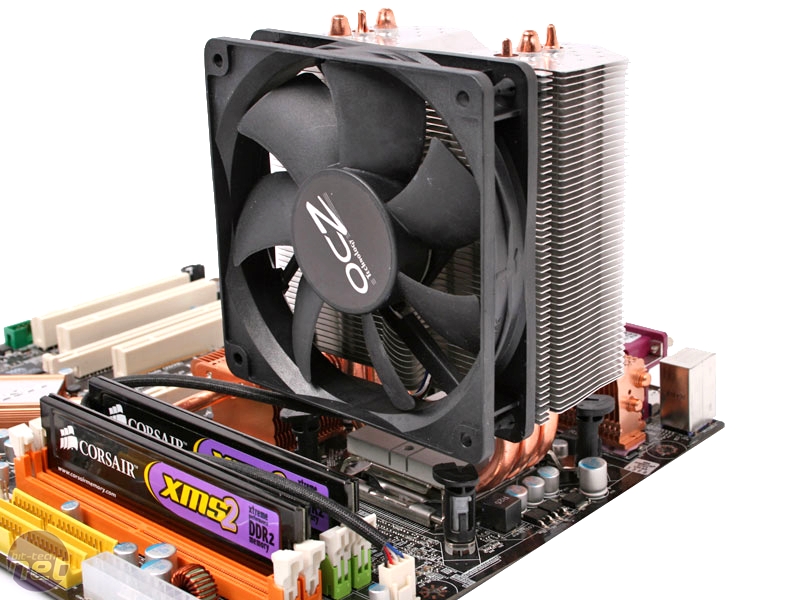
| Mortibus wrote: | lol that ocz is identical to Arctic Cooling Freezer 7 Pro
now who stole from who? 
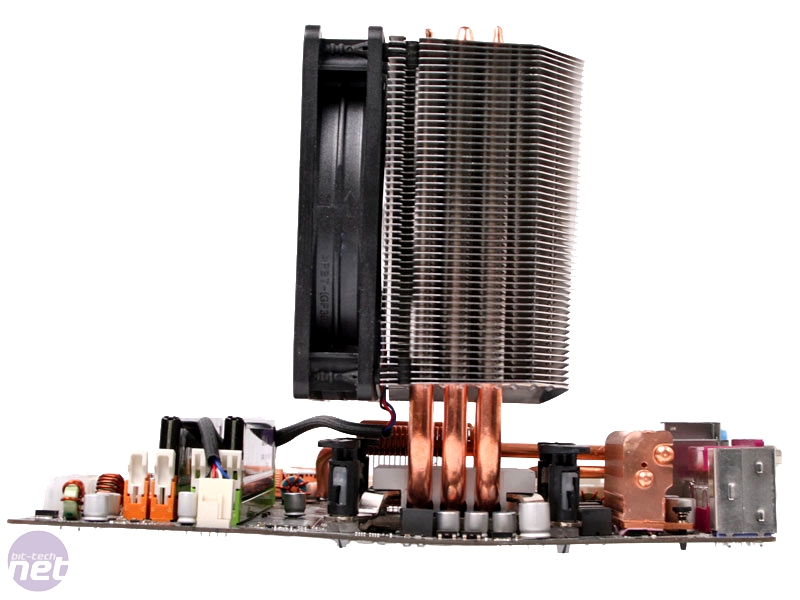
holy shit look at that mobo bend 
something that does not happen with ac, so they stole it and still couldn't get it right |
If OCZ stole from anyone, it was from Xigmatek.
The OCZ is similar to the S-1283 as both are HSF coolers(where the heat pipes are directly in contact with the CPU surface) and have 8mm diameter pipes as opposed to the traditional 6mm, which helps heat transfer a lot.
| boundle (thoughts on cracking AITD) wrote: | | i guess thouth if without a legit key the installation was rolling back we are all fucking then |
|
|
| Back to top |
|
|
|
|
| Posted: Sun, 22nd Mar 2009 15:14 Post subject: |
|
|
that bend is pretty bad for something that doesn't involves screws
|
|
| Back to top |
|
|
tonizito
VIP Member
Posts: 52366
Location: Portugal, the shithole of Europe.
|
| Posted: Sun, 22nd Mar 2009 15:27 Post subject: |
|
|
| Mortibus wrote: | | that bend is pretty bad for something that doesn't involves screws |
Yeah. The minute I finished reading that review I went ahead and ordered that Thermalright bolt thru kit. 8€ and totally worth it. Just imagine yourself playing Crysis when you hear a snap(one of those pins jumping from the strain) from inside the case... 
I think that it was Intel that mentioned somewhere that the plastic pins where recommended to use with coolers up to 500g... That OCZ weighs almost 800.
| boundle (thoughts on cracking AITD) wrote: | | i guess thouth if without a legit key the installation was rolling back we are all fucking then |
|
|
| Back to top |
|
|
| Page 2 of 2 |
All times are GMT + 1 Hour |